





Table of Contents
Highlights
- Xbox Cloud Gaming arrives on select Hisense and V homeOS TVs in 2026 — no Xbox console required.
- Stream hundreds of Game Pass titles like CoD: Black Ops 7 using just your TV and internet.
- Great for casual gamers, students, and budget setups, but it requires a solid broadband connection.
- Cloud gaming has tradeoffs like latency, subscription limits, and no physical ownership.
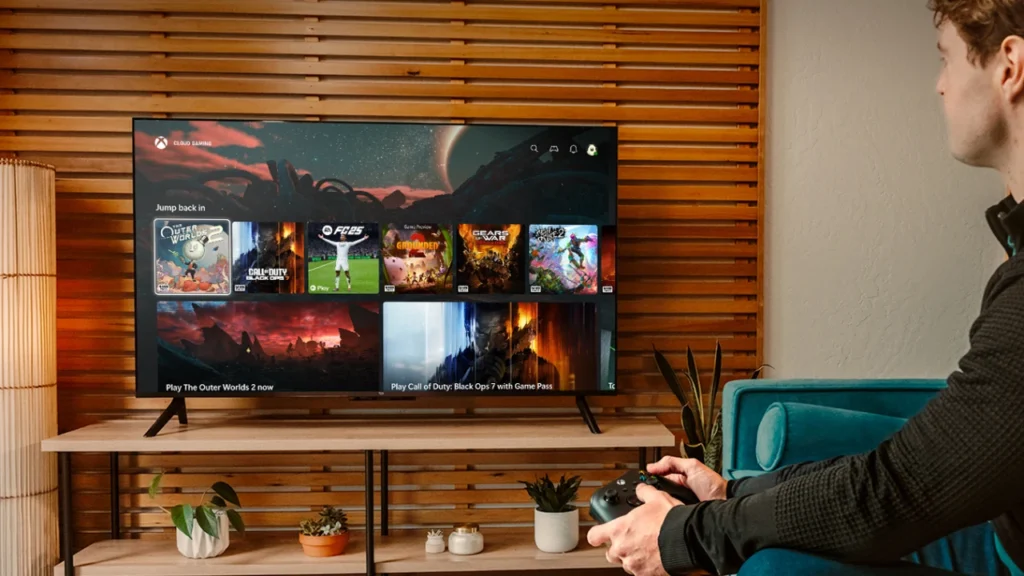
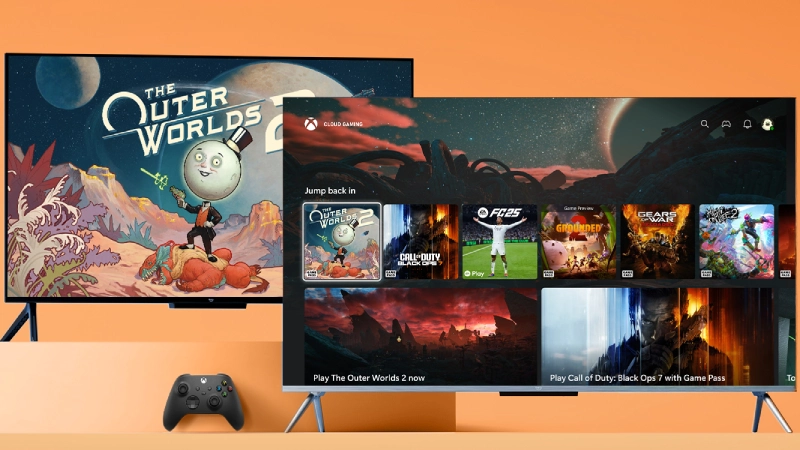
You don’t need a console to be a gamer anymore, and Xbox just doubled down on that idea. In 2026, Xbox Cloud Gaming is coming to select Hisense and V homeOS-powered smart TVs, letting you stream big‑budget titles straight on your TV, no Xbox box under the screen, no PC tower on your desk.
Here’s what this means for gamers, content creators, casual players, parents, and basically anyone who likes pressing “Play” after a long day.
What exactly is Xbox Cloud Gaming on Hisense and V homeOS TVs?
Xbox is partnering with Hisense and V (formerly VIDAA) to bring the Xbox app to select homeOS-powered smart TVs in 2026. If you have Xbox Game Pass (Ultimate, Premium, or Essential), you’ll be able to:
- Stream hundreds of games via Xbox Cloud Gaming
- Play big titles like Call of Duty: Black Ops 7, Hollow Knight: Silksong, and Clair Obscur: Expedition 33
- Use just a compatible controller + good internet, no console
Think of it as “Netflix for games,” but running directly on your TV. It is great for renters and students who move often and do not want to carry heavy consoles and boxes every time they move from one hostel or apartment to another.

PRO TIP:
If you’re planning to buy a new TV in 2026 and you like gaming (or your kids/roommates do), checking for “Xbox app / homeOS cloud gaming support” could save you the cost of a console.
Big Wins: Why Xbox Cloud Gaming on Smart TVs Is a Game-Changer for Everyday Players
1. Zero Console Setup: Clean, Minimalist Gaming on Your Hisense TV
No Xbox Series X/S needed. Your TV becomes the console.
- Perfect for small rooms, hostel/PG setups, shared living, or minimalist setups.
- Fewer cables, no overheating console, no extra HDMI hassle.
A student in a hostel with just a smart TV and Wi‑Fi can still grind ranked matches or story games without begging for desk space or power sockets.
2. Budget-Friendly Gaming: How Xbox Cloud Streaming Cuts Your Upfront Costs
You avoid a big console purchase and pay for:
- A compatible TV (which you might buy anyway)
- A Game Pass subscription
- A controller (which many gamers already have)
For people on a budget or in regions where consoles are heavily taxed or hard to find, this is a huge win.
PRO TIP:
If you’re more “Netflix + occasional gaming” than “hardcore collection of discs,” paying monthly for Game Pass + cloud might be cheaper than buying full‑price games and a console.
3. Play Anywhere: Cloud Saves, Cross-Device Xbox Gaming, and Creator Flexibility
Microsoft’s “Everywhere is Xbox” / “This is an Xbox” strategy means:
- You can start a game on TV, continue on a handheld phone, or resume on a PC via the cloud.
- Your achievements, friends list, and game library follow you.
- Great for streamers and content creators who move between setups.
Gamers can record chilled story-mode footage from their couch on TV, then later capture higher‑quality clips on PC when they have time, all with the same saves and progress.
The flip side: Real-world downsides you should consider
4. Internet Requirements: Why Your Wi‑Fi Can Make or Break Xbox Cloud Gaming
No good internet = no good cloud gaming.
- You need solid, stable broadband and low latency.
- Wi‑Fi congestion (busy flats, dorms, prominent families) can cause lag and stutter.
- Power cuts or ISP issues = your “console” just died.
Cons:
- Competitive multiplayer (shooters, fighters) can feel off if your ping spikes.
- Rural areas or regions with expensive data caps may struggle.
If you can’t stream 4K video smoothly without buffering, expect cloud gaming to struggle too.
5. Digital Ownership vs. Cloud: What You Really Get with Game Pass Streaming
Cloud gaming + Game Pass is like renting:
- Games can leave Game Pass.
- Server issues or regional changes can lock you out.
- If your sub lapses, your access vanishes (except for any separately purchased cloud‑enabled titles).
For collectors, modders, and preservation nerds, this is a big con. You can’t:
- Resell, lend, or trade discs.
- Tweak files, install mods, or keep old versions.
If you love trying many games quickly, the cloud is great. If you love owning a few favorites forever, physical or local digital may still be better.
6. Input Lag and Graphics: How Cloud Gaming Compares to a Real Xbox or Gaming PC
Cloud gaming compresses and streams video to your TV:
Pros:
- You can get “next-gen level” visuals on a cheap TV with no heavy GPU.
- No need to upgrade hardware every few years.
Cons:
- Even on fast nets, there’s always a bit of input delay.
- Compression = artifacts, blur in dark scenes, or smeared details.
- Serious esports-style players may prefer a real console or PC.
Story games, RPGs, casual titles, and indie games feel great. High-rank competitive CoD or fighters? Some players will notice the lag and hate it.
Who Should Try Xbox Cloud Gaming on Hisense TVs (and Who Should Skip It)
- Casual gamers / daily people:
- Big plus: Easy setup, small cost, couch-friendly.
- Watch out: Needs strong Wi‑Fi and a monthly subscription.
- Gamers & ranked grinders:
- Big plus: Play anywhere, massive library.
- Watch out: Latency for competitive modes, no offline play.
- Content creators/streamers:
- Big plus: Fast access to new Game Pass titles to review/stream.
- Watch out: Your home internet must support both cloud gaming and streaming uploads simultaneously.
- Parents/families:
- Big plus: No expensive console to break, parental controls via TV + account.
- Watch out: Need to manage screen time and sub costs just like Netflix.
Is Xbox Cloud Gaming on Hisense Smart TVs Worth It in 2026?
This move makes gaming more open, flexible, and less tied to expensive hardware. For many people, especially new gamers, students, families, and creators testing lots of titles, it’s a powerful and convenient option.
For others who care about raw performance, absolute ownership, mods, and offline play, a console or PC will still be king.
Would you trust the cloud to be your “main Xbox,” or do you still want a physical console or a gaming PC under your desk?
