





Table of Contents
Highlights
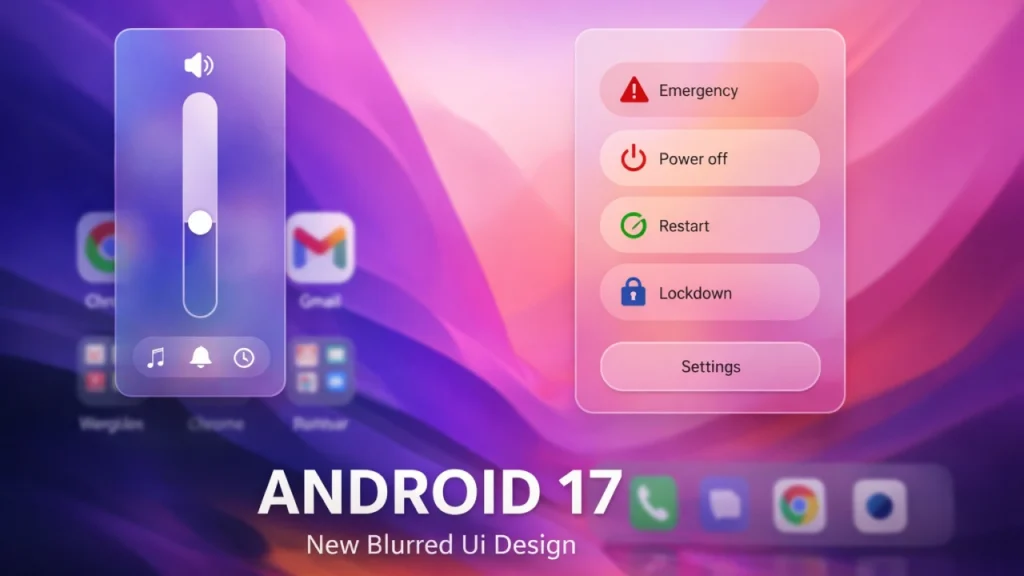
- Android 17 leak reveals a system-wide blur UI, introducing a glassy, translucent design across the notification shade, quick settings, volume slider, and power menu
- A floating pill-shaped screen recorder brings real-time controls, audio source selection, touch indicators, previews, and easy sharing options
- Native app lock and enhanced privacy controls add biometric protection, hidden message previews, and stronger system-level security
The Android 17 update introduces new features through its leaked content and initial screenshots, which display major changes to its interface and enhanced system functionalities. 9to5Google and other news sources show that Android 17 will deliver an improved visual experience with better user interface components, which include expanded blur UI, new screen recording features, advanced privacy options, and operational improvements.
A Fresher, Glassy UI With System-Wide Blur
The system-wide blur effect creates a new transparent appearance for the entire interface, which matches the modern glassy design trend. The Android 16 notification shade and Material 3 Expressive system display the notification shade with translucent elements, while Google 9to5Google blud style extends from these elements to complete system controls of the volume slider, power menu, quick settings, and core components. The interface elements now display translucent backgrounds, which reveal underneath wallpaper colors and app icons, thereby creating a more delicate and complex appearance to the interface.
The glass-like effect creates a visual depth which users find attractive despite its main purpose being aesthetic. The early screenshots demonstrate that the blur effect changes according to the user’s selected theme and wallpaper colors, which results in a more unified and sophisticated design.
Floating Screen Recorder and Revamped Tools
Android 17 introduces practical system tool enhancements that exceed its visual improvements through its screen recording feature. The leaks show Android 17 uses a floating pill-shaped screen recorder UI, which lets users access recording functions while they record their screen. The improved recorder allows users to select their input sources, which include device audio and microphone, and both sources together, while showing touch indicators during the final recording. The feature enables users to preview their recording after it ends, which shows them editing options and sharing options to create a more comprehensive user experience.
Native App Lock and Bolstered Privacy Controls
Android 17 introduces security and privacy improvements throughout its system. The leaks show evidence of a built-in app lock feature, which Google integrated into its operating system through its long-press menus. Users can secure their applications through biometric authentication and device password protection, which lets them manage their sensitive information better.

The Android Authority
The new privacy feature, which leaks disclosed, will provide locked applications with hidden message previews that users can see only after they complete authentication. This change would further protect personal information on locked apps, reinforcing Android’s privacy posture at the system level.
Continuing UI Refinements and Quick Settings Changes
Android 17 will deliver new UI features through two new functions, which include UI changes and atmospheric blurring. The leaks show that the unified notification and quick settings panel will undergo change,s which will either result in its separation into two separate components or its redesign to match how most manufacturers design their user interfaces. The system enables users to access their quick settings and notifications from any of their applications, which they open on their device.
Google has initiated changes to its notification panel design,n which began with the introduction of Android 16 and continues through subsequent Android updates. The development of Android 17 builds upon previous progress by providing users with smoother and more intuitive system functions that enhance their daily activities.
Design Direction and Broader Context
Some industry observers see Android 17’s expanding use of blur as part of Google’s broader design evolution, which Google developed through its user interface research and analysis of competitor design trends. The enhanced features of the system provide visual upgrades to the interface, but they do not create fundamental changes because Google continues to enhance Android through its efforts to achieve a more modern appearance without diminishing user experience.
What to Expect and Release Timeline
Android 17 exists in its current state as a collection of internal builds that have become public through unofficial leaks. Google has not announced an official date for Android 17, but the operating system will launch in 2026 with its first preview at the Google I/O event, followed by the stable version release later that same year. The leaked information, which multiple reliable sources provide, shows that the three features, which include the blur UI, floating screen recorder, and app lock feature, will stay in the final product.
