





Table of Contents
Highlights
- Developers use AI copilots mainly for small tasks, not full features.
- Testing, reviews, and debugging remain critical for AI-generated code.
- Licensing and data safety create real risks when using AI in IDEs.
- Balanced AI adoption improves speed without harming long-term code quality.
AI for coding is everywhere now. In years past, writing code required hand-coding every line, but now, many developers will open up their IDE (integrated development environment) and see code suggestions appear as they write the line of code. GitHub Copilot and other AI-powered code creation tools have completely changed the way that many developers do their daily coding.
Some developers love these tools, and some developers don’t really put much faith in them. However, the truth is somewhere in between. While AI does provide assistance, it may not do so perfectly if used incorrectly.
This article provides information regarding how developers use AI to assist them when coding, what work flows through your IDE might allow for you to work more effectively with AI, what you need to do to be safe while working with AI within your IDE, and the reasons why testing, performing code review, licensing, and debugging will continue to be important as you successfully employ AI for code assistance.
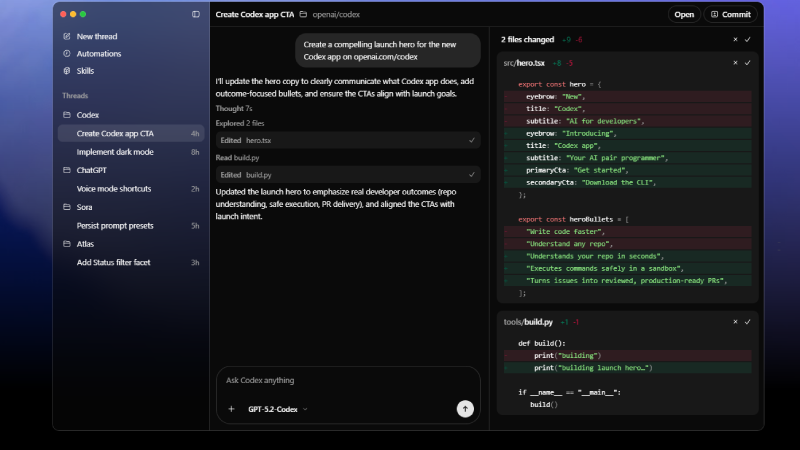
Why AI Is Now Part of Everyday Coding
Most AI coding tools work like a smart helper. You start writing a function, and the tool tries to guess what you want next. Sometimes it gets it right. Sometimes it doesn’t. Developers mostly use AI for simple things. Writing common functions, setting up basic logic, or fixing small errors. These tasks take time but don’t need deep thinking. AI helps speed them up.
But AI does not understand your full project. It does not know why your product exists or what problem it solves. It only sees patterns from old code. That’s why AI should never be the final voice in coding.
How Developers Actually Use AI Copilots
Good developers don’t let AI run the show. They use it like a rough helper. Many developers use AI only to create the first version of code. After that, they go through every line and change it as needed. This keeps control in human hands.
AI works best when tasks are small. Asking AI to build a full feature often leads to messy results. Breaking work into small parts gives better code and fewer mistakes. AI is useful when you already know what you want. It is not good when you are confusing yourself.
Keeping AI Use Safe Inside IDEs
Using AI inside an IDE feels easy and smooth. That comfort can lead to careless habits. One big rule is never sharing private data. Things like passwords, API keys, company URLs, or user details should never be typed where AI tools can read them. Even trusted tools should be handled carefully. Once data leaves your system, you don’t fully control it.

Another safe habit is not accepting AI code blindly. Many developers make the mistake of pressing Enter without reading suggestions. That’s where bugs start. Manual checking slows things down slightly, but saves hours later.
Why Testing AI Code Needs Extra Care
AI-written code can look clean but still fail in real use. Many AI tools write code that works only for perfect situations. Real users don’t behave perfectly. Inputs break. APIs fail. Networks go down. This is why developers should always test AI code properly.
Unit tests help catch logic issues. Integration tests show how code behaves with real systems. Both are important. Performance testing also matters. AI sometimes writes code that works but uses more memory or runs slower than needed. Just because code runs does not mean it’s good code.
Code Reviews Are Not Optional Anymore
Code reviews were important even before AI. Now they matter even more. AI can write code that looks neat but hides problems inside. Reviewers should focus less on how code looks and more on what it does. Every part of the code should answer a simple question. Why is this here?
If no one can explain it clearly, it should not be merged. Teams that skip reviews because AI “wrote it” usually regret it later.
The Licensing Problem Many Developers Ignore
One of the biggest risks with AI coding tools is licensing. AI tools are trained on public code. That includes open-source projects with different licenses. Sometimes, AI output can look very close to existing licensed code. This creates legal risk, especially for companies building paid products.

Developers should understand the license rules of the AI tools they use. Some tools give clearer rights than others. A safe approach is to never use AI for core business logic. Important code should always be written by humans. This protects both legal safety and product value.
Debugging AI Code Feels Different
Debugging AI-produced code can be a pain. The code may seem okay, but the results produce odd behaviour. That’s due to AI’s tendency to combine ideas from many different places. The logic produced by the AI should not be assumed to be valid. It is helpful to read the code slowly and to add comments in order to help understand what the code is doing.
Logs can be of great help in diagnosing the problems created by AI-created code when there is an unexpected result. Logs provide insight into where and how things went wrong. In many cases, it is quicker to recreate the AI-generated code by hand than to repair it. That is both common and acceptable.
Long-Term Code Quality With AI
AI can help today, but cause problems later if not controlled. Different AI suggestions can create uneven code styles. This creates challenges in the codebase over time, making it harder than ever to manage. It is important to have proper rules for coding, format tools, and regular reviews in order to maintain consistency.

In addition, developers should continue their own development. Relying solely on AI can lead to a decline in developers’ knowledge of how to create code; AI should be an aid for developers’ thoughts rather than a substitute for their thought processes.
How Real Teams Use AI Today
Many teams now have clear rules around AI usage. AI is allowed for basic tasks. Sensitive logic is written manually. Reviews are mandatory. Data sharing is restricted. This balanced approach works well. Teams that respect AI limits usually get faster results without breaking quality.
What the Future Looks Like
AI coding tools will get better. They will understand context more clearly and help with testing and debugging. But responsibility will always stay with humans. AI can suggest code, but humans decide if it belongs in the product.
Final Words
Coding with AI can be beneficial, but when developers use AI, it is critical to do so with self-discipline and a methodical approach. Proper workflow, thorough testing, solid review processes, and understanding of legal implications will keep the projects safer. Developers who use AI as an assistant and not simply an easy way to complete tasks will find the best success over time.
