





Table of Contents
Highlights
- Gemini AI introduces Inbox Overviews that summarize long email threads.
- Natural-language search lets users query like “Find last year’s estimate.”
- Smart Inbox prioritizes key messages and actionable to-dos.
- Enhanced AI writing tools simplify drafting and proofreading.
AI Gmail has entered the Gemini era as Google rolls out a major upgrade that adds smart summaries, natural-language search, and AI writing tools. This new phase features advanced generative AI built on the company’s Gemini 3 model. This change marks a major shift in how users interact with their inboxes. Gmail is evolving from a static email client into a smarter, more proactive AI email assistant. It can now summarize threads, answer questions, draft messages, and highlight priority tasks.
AI Overviews: Summarizing Conversations and Answering Questions
A key part of the Gemini integration is the new AI Overviews feature. This tool automatically turns long email threads into concise summaries that highlight key points. It saves users from the tedious task of sifting through dozens of messages. Instead of manually searching for details, Gmail places the most important information at the top of conversations.
The innovation doesn’t stop there. Users can now ask their inbox questions in natural language. For instance, rather than trying to remember specific keywords to find an old quote, a user could ask,
- “Who gave me an estimate for home renovations last year?”
- “What was the budget discussed in this thread?”
Gmail’s Gemini AI will search the inbox, even old messages, to provide a direct answer. This feature replaces the traditional keyword-based search with a more intuitive retrieval process.
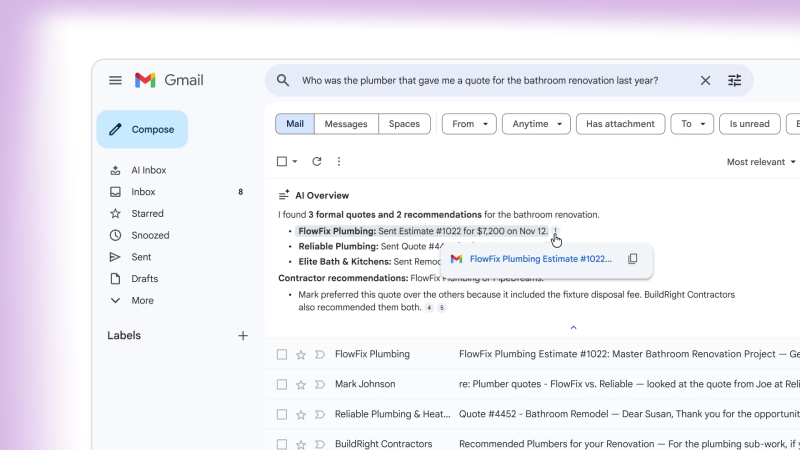
AI Overviews and natural language query support are being rolled out to all users for free. More advanced question-answering features are available to Google AI Pro and Ultra subscribers.
A Smarter Inbox: Priorities, To-Dos, and Intelligent Organization
Along with summarization, Gmail’s AI Inbox offers a new way to view and manage email. Instead of showing messages in a simple chronological list,
- The AI Inbox brings forward priority items
- Identifies actionable to-dos like bills, appointments, and follow-ups
- Flags messages from key contacts based on context and usage patterns.
This creates a personal briefing area at the top of the user’s email, helping busy people and everyday users quickly grasp what’s most important without hunting through numerous unread messages. Signals like frequent contacts, inferred importance, and contextual hints help decide what gets highlighted.
These features are initially available to a select group of testers and will gradually roll out to more users. They reflect Google’s larger goal of tackling the issue of email overload using an AI-powered organization.
Enhanced Writing Tools: AI Assistance for Composing and Replies
Writing emails is another area seeing significant AI-driven changes. Gmail’s Smart Replies feature has been improved to Suggested Replies, which considers the entire context of email conversations to offer relevant one-click responses.
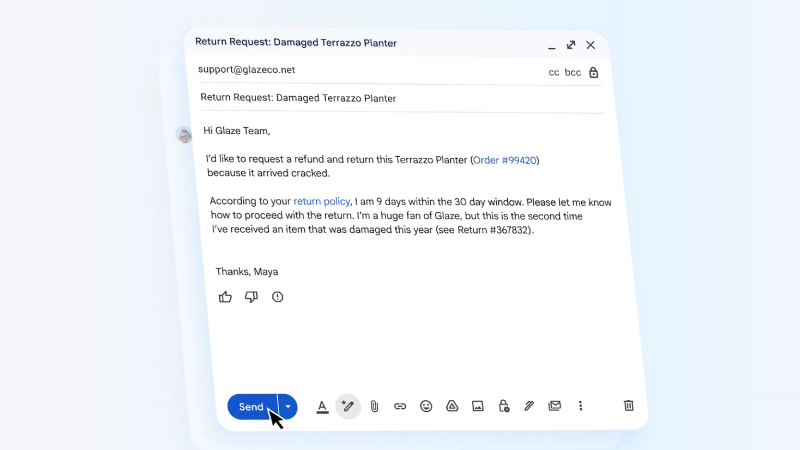
Meanwhile, the Help Me Write tool is available for all users. It helps draft new emails or refine drafts by converting a short prompt into a polished message.
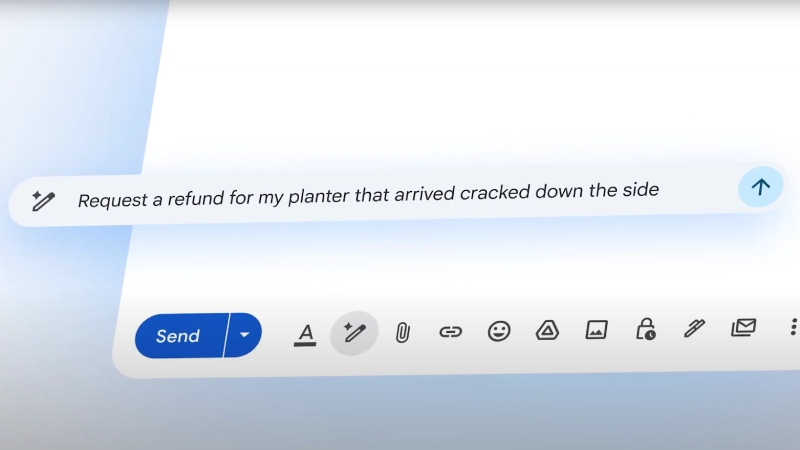
Subscribers to Google AI Pro and Ultra subscription plans will also get an upgraded Proofread feature. This goes beyond simple spell-checking to review grammar, tone, and style. It helps ensure outgoing messages are professional and compelling.
Together, these tools aim to cut down the time users spend composing and editing emails, which is a significant part of daily inbox interaction. As a result, even routine communication tasks become faster and more intuitive.
Integration and Workflow Enhancements
Beyond these main features, Gmail’s Gemini era update shows deeper integration across Google’s productivity tools. With enhanced AI reasoning and context awareness, future capabilities may include smarter scheduling, automatic tasks like meeting setups, and even summarization that connects email content and Google Drive files.
For instance, by understanding both user calendar data and email content, Gmail could automatically suggest meeting times, draft invites, and handle logistics without the user needing to switch between apps. While some of these advanced features are still being rolled out, they show how deeply generative AI could change everyday productivity.
Privacy Considerations and User Control
As Gmail becomes smarter, it also raises questions about data usage and privacy. Some experts have urged users to review and potentially disable certain AI features, noting that Gmail’s AI might need to scan email content to function effectively. While Google claims it does not use personal email content to train its Gemini models, users can still turn off smart features in Gmail settings if they prefer a more traditional email experience.
These privacy discussions highlight a broader industry issue: balancing the benefits of AI tools with clear data practices and user control. Despite these concerns, integrating Gemini into Gmail shows a trend toward smarter, more contextual software that anticipates user needs and reduces manual work.
What This Means for Users
Gmail’s Gemini era signifies a big change in email management. It transforms a historically passive tool into an active, AI-assisted, context-aware, and task-focused one, an assistant that can summarize, prioritize, and even draft messages. Instead of just reacting to an inbox full of messages, AI helps users focus on what matters most with less effort.

For personal users, this means quickly catching up on long threads, finding buried information in old emails, or composing persuasive messages without starting from scratch. For professionals, the ability to prioritize tasks and highlight key follow-ups could greatly enhance workflow and productivity.
As Gemini AI continues to roll out in Gmail and eventually across other languages and regions, millions of users around the world may find themselves interacting with email in ways that once only existed in visions of smart computing.
