


Highlights
- The MagicOS 10 Update brings new Bullet Screen notifications and a screen-off AFK mode—small tweaks that target where it matters most for gamers.
- The MagicOS 10 update smooths everyday gameplay while helping protect battery life and reduce screen wear.
- These feel like smart, incremental refinements rather than headline-grabbing features—but they noticeably improve day-to-day use.
- With this MagicOS update, Honor’s Game Assistant becomes less intrusive, more power-efficient, and better tailored to serious mobile gamers.
Honor Improves Game Assistant With Bullet Screen Notifications and Screen-Off AFK Mode
Honor’s MagicOS has issued a minor but considerate refresh of its built-in Game Assistant, adding two useful features to make mobile gaming less intrusive and more power-efficient.
The update, announced November 17, 2025, introduces a bullet-style messaging overlay and a screen-off AFK mode that together solve two major daily annoyances: interruptions from full-screen notifications and wasted screen-on time during long, repetitive gaming sessions.
It is not a headline-making novelty, but it clearly aims to improve the regular experience of gamers who want to save battery life and screen health while letting their games run in the background.
What the new features do
1. Bullet-style Notification Features
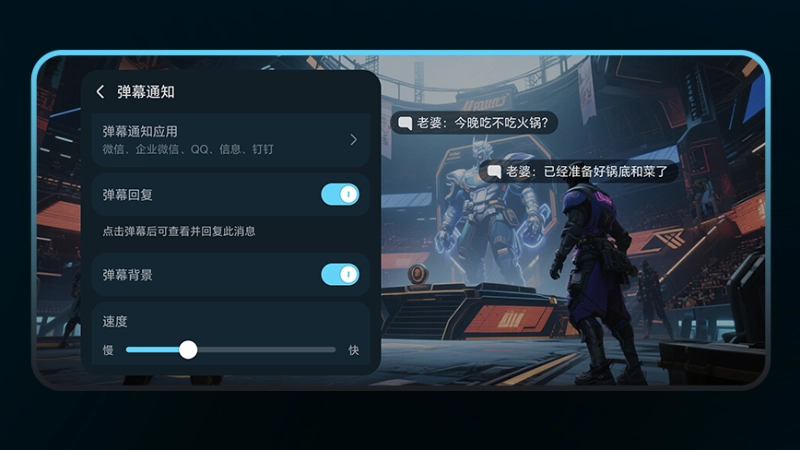
The bullet-style notification feature presents incoming messages as floating, scrolling text over the active game instead of a large system pop-up. That prevents the message from taking up the entire display with an alert.
These bullet-comment-style messages now slide across the game view as a translucent strip so that players can glance at them quickly. Users can adjust parameters to their preferences, such as scrolling speed and background transparency, through the Game Assistant’s interface, fine-tuning the experience to their needs.
The effect can be compared to a comment on a video platform’s live stream: brief, glanceable, and designed to keep immersion intact while preserving awareness.
2. Screen-Off AFK Mode: Better Battery and Screen Protection
The screen-off AFK function is intended for long stretches of auto-play, such as farming, resource collection, or other background tasks where visual monitoring is unnecessary. In this mode, MagicOS lets the game run while the display turns off automatically, reducing power draw and lowering the risk of OLED burn-in.
The game’s active processes continue in the background, so progress can unfold uninterrupted, without the display burning battery or overheating.
There is one significant limitation to consider: if the device locks during an AFK session, the mode will automatically terminate. Users should keep the device unlocked or adjust the lock settings to keep it that way if they want an uninterrupted background run.
3. Fewer Interruptions With Bullet Screen Notifications
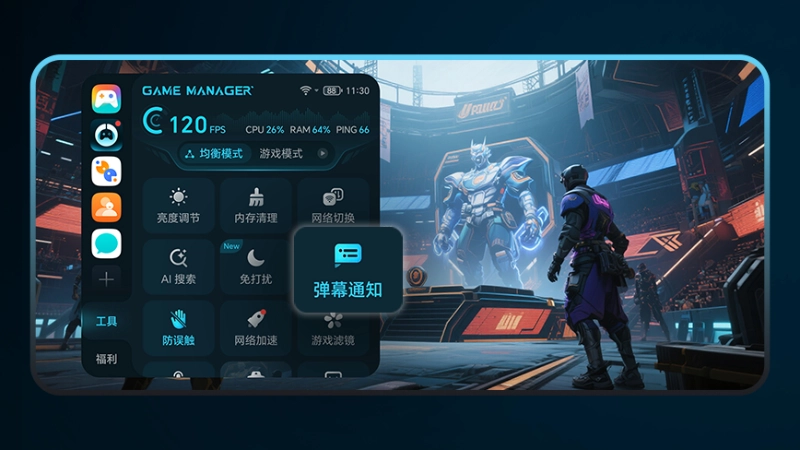
Both features are incorporated into the Game Assistant, which presents itself as a floating control unit while a supported title is running. Within a compatible game, swiping out the Game Assistant panel reveals a “Tools” section where you can enable and configure the bullet-style overlay and screen-off AFK.
The design deliberately keeps controls light and easy to access so players can change their settings within the game. Because these are native parts of the system assistant rather than separate third-party applications, they launch quickly and feel like a natural extension of the gaming experience rather than an intrusive system overlay.
4. Better Convenience for All Playstyles
These enhancements address two persistent annoyances that affect mobile players. The bullet-style alerts reduce the frequency and severity of interruptions, letting players glance at an incoming message without their gameplay being halted. For anyone who streams or is even just a casual player, floating comments prevent large system pop-ups and keep broadcasts cleaner.
Meanwhile, the screen-off AFK option reduces battery consumption while preserving screen longevity. This feature reduces heat and the risk of the OLED burning into the panel while still allowing the in-game processes to proceed. Because differing playstyles, whether they be competitive, casual, or content-creating, can adjust the settings of the overlay’s look and behavior, these features together improve convenience while reducing wear on hardware and letting players have better control over their device while gaming.
Honor is focusing on practical, quality-of-life improvements – like Bullet Screen Notifications – that meaningfully enhance daily performance for gamers.
Where this fits in MagicOS’s roadmap
The timing of the update aligns with Honor’s ongoing refinements to MagicOS, most notably around the testing cycle of MagicOS 10, which has seen UI tweaks like a real-time blur effect in quick settings and other polish-focused changes. New Game Assistant options show the OS’s current focus on quality-of-life improvements over dramatic new functionality.
Adding small, targeted capabilities to an existing assistant is how Honor aims to address the incremental issues that add up to a noticeably better day-to-day experience for power users and gamers.
There are also a few points users should keep in mind while trying these new features. Locking the phone stops a screen-off AFK session, as we discussed, so sure, those who intend to leave games running unattended should either lengthen the auto-lock timeout or use a smart unlock option. Bullet-style notifications surface messages from permitted apps on top of gameplay, so anyone concerned about their privacy should review which apps are allowed to display the text and restrict sensitive apps if necessary.
Not every title will behave identically; some games or digital rights management policies prevent background play, so that results can vary from one title to another. Lastly, while switching the display off during AFK reduces power draw, the device’s CPU, GPU, and network modules may still be active; battery savings will depend on how resource-intensive the specific game and its network interactions are.
For Honor users who often leave games running or who particularly hate being pulled out of the moment by large system pop-ups, these new features are worth testing once they arrive via the relevant updates.