


Highlights
- Microsoft Edge enables Scareware Blocker by default on Windows & macOS.
- On-device AI/computer vision flags fake pop-ups & system alerts; analysis stays local (no screenshots/data sent).
- Integrated with Defender SmartScreen for faster, community-driven threat intel.
- Real-time, behavior-based protection for a safer browsing experience.
Microsoft is moving further towards a safer web browsing experience with its expanded rollout of Scareware Blocker to users of Microsoft Edge. Announced on October 31, 2025, the update now makes this AI-powered protection feature available by default to millions of users across both Windows and macOS, making it safer than ever to navigate the web than any other Browser.
What is a Scareware
Scareware is the name given to deceptive pop-ups or full-page designs that masquerade as system warnings – things like your computer is infected, your data is at risk, or “please pay this fee immediately for cleanup.” Scareware scams often keep a user in full-screen mode, blast alarming noises, and play on the social engineering mechanisms to compel clicks in the spirit of panic.
Many traditional security tools, like SmartScreen or antivirus, will block known malicious URLs, however, scareware sites evolve quickly, and the function of the new Scareware Blocker paves the way for it to provide protection in a new way. It does this by identifying behavioral, and visual characteristics of such sites, and does not rely upon blacklisting.
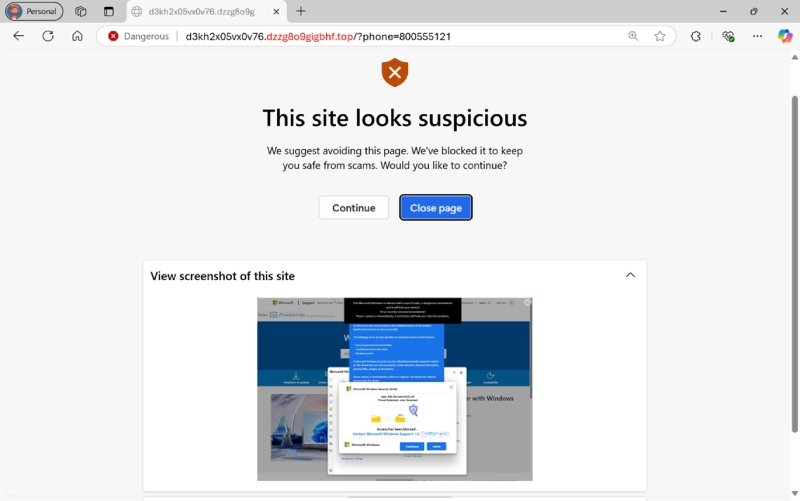
An Overview of How the Scareware Blocker Works
The solution features a locally based machine learning model that utilizes computer vision to identify the visual indicators and corresponding interactive practices commonly associated with scareware scams. When the model is activated, Edge will automatically:
- Switch from full-screen mode to give the user back control
- Mute any excessively loud audio
- Show a warning banner and a thumbnail of the suspicious page
All of this analysis is conducted on the user’s local machine, not sending any screenshots or sensitive information to Microsoft’s servers. This notion of privacy is a key part of the company’s wider design principle for AI safety to run on user devices.
Increased Availability and Enabled by Default
The Scareware Blocker was launched as a limited preview earlier in 2023, and now it is being turned on by default on most Edge users on a system that has 2GB or more of RAM and four CPU cores. Devices that meet the specifications will receive the protection automatically through quarterly browser updates—in other words, no setup needed.
This increased rollout increases Edge’s defensive approach even wider than before, protecting average users who may not be aware that browser-based scams exist. For enterprise use, administrators can configure or disable the Scareware Blocker using official group policies.
Integration with Microsoft Defender SmartScreen
The potential of the Scareware Blocker extends beyond users — it enhances the overall security ecosystem provided by Microsoft. If a scam webpage is verified by an individual user, Edge has the capability to share anonymized data with Microsoft Defender SmartScreen, the company’s primary threat intelligence service.In the preview version, every report from a user protected an average of fellow users from fifty other cases of the same scam.
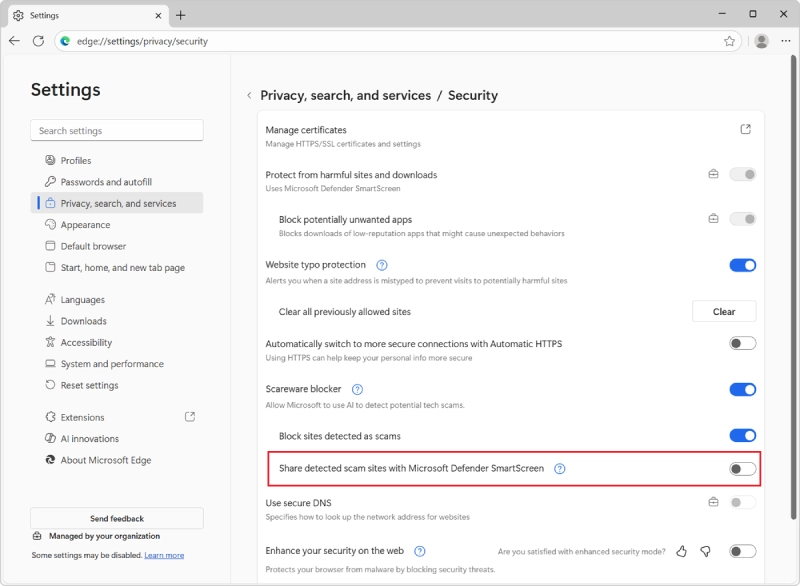
This community defense idea, makes every report a contribution to a safer Internet.Edge 142 introduces a new “scareware sensor” feature that, upon enabling, allows verified detections to be shared with SmartScreen in real time. However, the feature is disabled by default and is not supported during InPrivate browsing. With this feature, Microsoft is beginning to deploy a speedier, community-based threat response capability.
A Smarter, Faster Defense Pipeline
Microsoft claims to have improved SmartScreen’s internal pipeline to respond more quickly to new scareware reports. The goal is to reduce the response time from when a user has an initial encounter with a scam webpage to a global block, and ideally reduce the time for scam pages to proliferate before they are stopped.
This initiative demonstrates a larger trend toward more proactive, behavior-based threat detection. Rather than responding to attacks that had been previously reported, the AI models that Edge employs can read web content visually and behaviorally in real time; this is needed as scammers increasingly use generative AI to create sophisticated, enticing lures to email and text communications.
Balancing Security, Performance, and Privacy
While the benefits included in the blocker are apparent, Microsoft has also focused very much on system efficiency. On supported infrastucture, the AI model can be run on device and has minimal resource consumption while not interfering with normal web browsing.
For users on older systems, Microsoft may limit the automatic activation of the AI model for performance stability. Microsoft has also addressed user privacy: no screenshots or personal information leaves the device, and all of the scareware detection happens in Edge in real time. Users have full control and can choose to disable or report scareware detections.

The Bigger Picture
By combining AI driven visual detection of anomalies, user powered feedback loops, and real time threat intelligence into Edge, Microsoft is positioning Edge as a first-line of defense against the modern web scams of today and should enhance existing security pillars such as SmartScreen, Password Monitor, and improved phishing protections provided by Edge.
As cybercriminals continue to become sophisticated, using fake tech-support pop-ups and AI-generated alerts, a product like Scareware Blocker could offer a more immediate level of safety especially for non-technical users who might otherwise be targeted.The wider rollout illustrates how browser-level protection is evolving: it’s no longer just about blocking so-called “malicious downloads” but about understanding how users behave online, in real-time, to help users remain safe.
Final Thoughts
As far as AI innovation, privacy-first design, and community-driven security are concerned, the Microsoft Scareware Blocker is a thoughtful mix of these ideas. By rolling it out by default for more users and incorporating it into Defender SmartScreen’s intelligence, Microsoft is developing a more resilient defense, updating as quickly as scammers do.As Edge’s team said, the goal is simple and immediate: to provide for each person “not to be caught in an online scam again.” With this upgrade, Microsoft Edge gets closer to that promise.