





Table of Contents
Highlights
- WhatsApp Web now tests voice & video calls without needing a desktop app
- End-to-end encrypted web calling keeps privacy fully intact
- Future-ready upgrade with screen sharing is also under development
WhatsApp has been working to provide users with the ability to make voice and video calls via its web app. Before this new feature, WhatsApp’s calling feature was limited to either using the WhatsApp mobile application or the WhatsApp desktop application.
Users of WhatsApp will be able to make calls from their computers, even when their mobile device is not nearby, if this feature is accessible to all in the future. WhatsApp Web has maintained the same functionality since it was originally released. That might finally change.
Calls Are Being Tested on WhatsApp Web
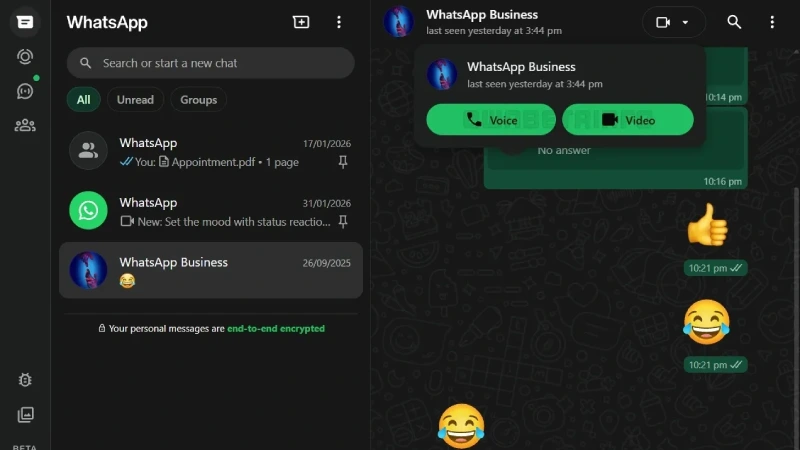
WhatsApp web is currently undergoing trials for its voice & video call feature. Some users have observed a button for calling available within one-on-one conversation windows, essentially mirroring what is available on the WhatsApp mobile app.
Up until now, WhatsApp web functionality only supported text messaging & file sharing. Making and receiving voice or video calls on the web version of WhatsApp is not possible at present. If someone tried to call, users had to switch devices. That has always been a weak point.
How Web Calling Will Work
Should the feature function on an account, users of the chat will notice both a voice icon and a video icon at the top of the page. Selecting either of these icons will contact the other user using the web browser, through which permission to utilise the microphone and camera is requested (by the web browser); once permission is given, the call will start.
The other user will see the inbound call on the phone app, desktop app, or via the web (if they have permissions) and can choose to accept the call from any of these platforms. No new software will be needed.
No Desktop App Needed
This is a useful change for many users. A lot of people use WhatsApp Web at work or on shared systems. Installing apps is not always allowed. With browser calling, WhatsApp Web becomes enough on its own. Linux users, who mostly depend on the web version, will also benefit from this update.

Call Privacy Will Stay the Same
WhatsApp is keeping end-to-end encryption for web calls too. This means calls stay private, just like on phones. WhatsApp or Meta cannot listen to the calls. The security rules do not change. This is important because many users trust WhatsApp primarily for its privacy.
Who Is Getting This Feature
Right now, only a limited number of users can see calls on WhatsApp Web. The feature is part of testing and is available mainly to WhatsApp Web beta users. WhatsApp usually releases big updates slowly. This helps them fix bugs before pushing it to everyone.
At this stage, calls work only for personal chats. Group calls on the web are still not live.
Screen Sharing Is Also Being Worked On
There are also signs that WhatsApp is testing screen sharing for web calls. This would allow users to share their screen during a video call. It can help during work calls, online support, or while explaining something to another person. Screen sharing already exists on the desktop app, so bringing it to the web makes sense.
Why This Update Is Important
WhatsApp Web has always felt incomplete. It worked, but only for basic things. Adding calling support makes it much more useful. People will not have to check their phones often during working hours.
In addition, WhatsApp appears to intend to develop the web application independently of its mobile software.
What Happens Next
More users are expected to get this feature soon. There is no update button. When WhatsApp enables it, the call icons will appear automatically. WhatsApp has not shared a timeline, but testing activity suggests a wider rollout is not far off.
Final Words
This update may look small, but it fixes a long-time problem. If WhatsApp rolls this out properly, WhatsApp Web will finally feel complete — not just a backup for the phone.
