


Microsoft has introduced several forward-looking enhancements in Windows 11 Insider update Preview Build 28020.1619, which is currently being distributed through the Canary Channel. The latest Windows 11 update, 2026, delivers ecosystem connectivity features together with accessibility enhancements, improved biometric authentication, and extended language support.
Cross-Device Resume Expands to More Android Experiences
The build introduces its primary feature, the expansion, which enables users to continue their work between their Android devices and Windows computers. This is one of the biggest highlights in Windows 11 Canary Build 28020.1619
Users can now resume their activities, which they started on their Android devices, directly on their PC.
Users can:
- Continue to listen to their Spotify music
- Open their active Microsoft Office documents
- Continue their existing web browsing sessions
The new feature strengthens Microsoft’s growing push toward seamless Android-PC connectivity and allows users to continue their Vivo Browser sessions on their PCs, which makes it easy to switch between devices.
Copilot App File Resume Support:
The Copilot application enables file resume capabilities on specific Android OEM devices, which include Honor, Oppo, Samsung, Vivo, and Xiaomi. The feature operates with online files only. The Microsoft 365 applications that users have installed will determine how files open for users who have these applications and for users who do not have these applications, reinforcing Microsoft’s growth.
Settings Agent Expands Language Support
Microsoft continues improving global accessibility by expanding supported languages for the Settings Agent feature.
Newly added languages include
- German
- Portuguese
- Spanish
- Korean
- Japanese
- Hindi
- Italian
- Simplified Chinese
These join existing support for English and French, making Windows configuration assistance accessible to a much broader global audience.
SCOOBE Refresh: A Redesigned Setup Reminder Experience
Some insiders will see a refreshed SCOOBE (Second Chance Out of the Box Experience) screen.
The redesigned interface aims to:
- Recommend optimal system settings
- Encourage feature discovery
- Improve visual presentation
This update appears selectively, reflecting Microsoft’s controlled rollout strategy within the Canary Channel.
Canary Channel Perspective
As part of the Canary Channel, Build 28020.1619 contains early-stage features that may evolve or change before reaching stable releases. However, the direction is clear:
- Deeper Android-PC integration
- Stronger accessibility customization
- Expanded biometric hardware support
- Broader global language inclusion
Now, users can
- Choose what the narrator announces.
- Adjust the order in which content is read.
The system provides enhanced control, which enables visually impaired users to customize screen-reading settings according to their personal needs. This feature helps users manage information better while achieving faster access to different content.
Windows Hello ESS Security Expansion,
The Windows Hello system now supports external fingerprint scanners through its Extended Security (ESS) system.
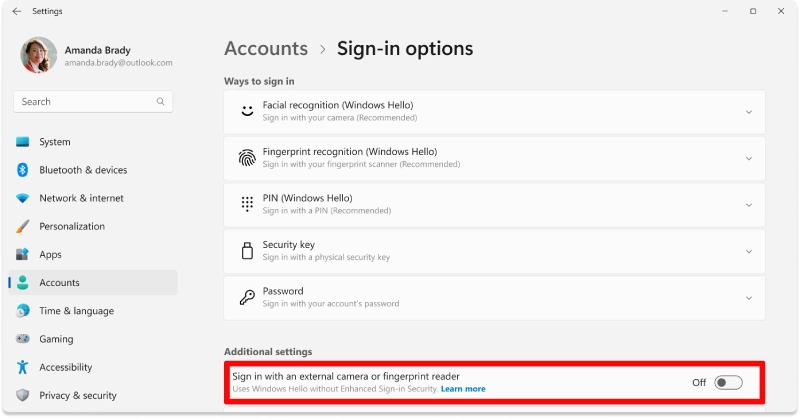
The security system for Windows Hello sign-ins through Enhanced Sign-in Security (ESS) now includes new protection features.
- Enterprise environments
- Users who need to upgrade their authentication system without needing new hardware.
- Microsoft increases biometric security options by allowing multiple devices to work with different security systems.
Voice Access and Voice Typing Updates
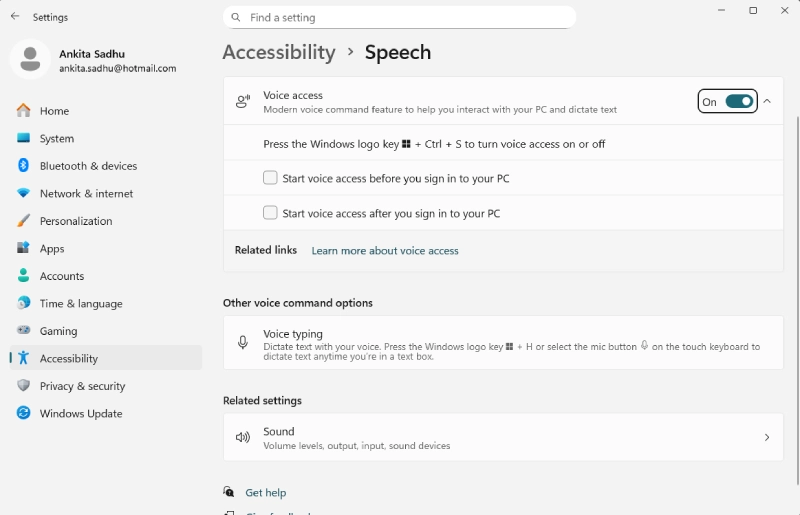
Voice Access Update introduces a new customization option designed to improve command accuracy through its new feature.
Wait Time Before Acting
The users must determine the time delay between issuing voice commands and their system execution. The system helps to accomplish three goals, which include:
- Preventing users from issuing unintentional commands
- Improving the system’s ability to understand commands
- Enabling users to control dictation in a more intuitive manner.
The feature will become available to all users, while most Canary-exclusive features remain exclusive to that platform.
Improved Onboarding Experience
The Voice Access system onboarding process has become easier through its new user-friendly interface.
- The system now provides users with better access to language models through improved download processes.
- The system lets users choose their preferred microphone through its simplified selection system.
- The system guides users through the onboarding process with its structured steps.
- This streamlined setup lowers the barrier for new users adopting voice-based accessibility tools.
The Settings A section in Settings A leads to the following pathway of user interface elements. The most recent enhancements for Windows 11 Insider builds run on the Beta, Dev, and Canary testing channels.
Conclusion
Windows 11 Insider Preview Build 28020.1619 focuses less on cosmetic changes and more on foundational improvements. The expansion of Cross-Device Resume signals Microsoft’s long-term ecosystem ambitions, while upgrades to Narrator, Voice Access, and Windows Hello ESS reinforce its commitment to accessibility and security.
For Windows 11 Insider Preview Canary Channel, this build offers a glimpse into the evolving future of Windows 11 – one that prioritizes seamless connectivity, inclusive design, and adaptive authentication technology. The alignment between ecosystems and Android manufacturers has reached its current state.